> ## Documentation Index
> Fetch the complete documentation index at: https://dotsdev.mintlify.site/llms.txt
> Use this file to discover all available pages before exploring further.
# Flow Styles
The Dots Flow solution supports extensive visual customization, allowing you to align the Flow's appearance with your site's design and brand. You can modify colors, buttons, borders, padding, and more to ensure a seamless user experience.
## Available configurations
You can customize the Flows' appearance by changing the theme and CSS variables. The `theme` parameter controls the overall appearance of elements that cannot be individually configured, such as the Dots logo or the date picker icon. The available themes are:
* `light` (default)
* `dark`
The variables object contains several parameters that work similarly to CSS variables, enabling you to customize specific Flow components. The complete list of customizable variables is presented in the following table:
| Variable | Description |
| ------------------------------- | --------------------------------------------------------------------------------------------------- |
| `backgroundColor` | Background color of the flow. |
| `primaryTextColor` | Color of texts used in titles and labels. |
| `secondaryTextColor` | Color of secondary texts used in sub-labels and buttons. |
| `tertiaryTextColor` | Color of tertiary texts, such as the default payout method indicator or the `Visit dashboard` link. |
| `primaryColor` | Primary color of the flow theme, such as button hovers or highlights. |
| `tabBackgroundColor` | Background color of the rail tab. |
| `tabHoverBackgroundColor` | Background color of the rail tab when the cursor hovers over it. |
| `tabBorderColor` | Border color of the rail tab. |
| `tabHoverBorderColor` | Border color of the rail tab when the cursor hovers over it. |
| `buttonBackgroundColor` | Background color of action buttons located at the bottom of each flow page. |
| `buttonTextColor` | Text color of action buttons located at the bottom of each flow page. |
| `buttonHoverTextColor` | Text color of action buttons when the cursor hovers over them. |
| `buttonHoverBackgroundColor` | Background color of action buttons when the cursor hovers over them. |
| `buttonDisabledBackgroundColor` | Background color of action buttons when they are disabled. |
| `buttonDisabledTextColor` | Text color of action buttons when they are disabled. |
| `inputBackgroundColor` | Background color of inputs such as checkboxes or text fields. |
| `inputBorderColor` | Border color of inputs. |
| `inputPlaceholderColor` | Placeholder color of inputs. |
| `borderRadius` | Border radius of buttons, tabs, icons, and inputs. |
The following code block presents the JSON structure you should use to set the Flow style.
```json theme={null}
{
"theme": "light",
"variables": {
"backgroundColor": "",
"primaryTextColor": "",
"secondaryTextColor": "",
"primaryColor": "",
"tabBackgroundColor": "",
"tabHoverBackgroundColor": "",
"tabBorderColor": "",
"tabHoverBorderColor": "",
"buttonBackgroundColor": "",
"buttonTextColor": "",
"buttonHoverTextColor": "",
"buttonHoverBackgroundColor": "",
"inputBackgroundColor": "",
"inputBorderColor": "",
"tertiaryTextColor": "",
"buttonDisabledBackgroundColor": "",
"buttonDisabledTextColor": "",
"inputPlaceholderColor": "",
"borderRadius": ""
}
}
```
## Customizing a Flow
To apply the custom styling to your Flow, follow the steps:
1. First, you need to stringify the configurations, including `theme` and `variables`, converting the configurations to a JSON string.
2. URL encode the JSON string.
3. Append the encoded string as a `?styles={url_encoded_config}` query parameter to the Flow link when attaching it to an iframe.
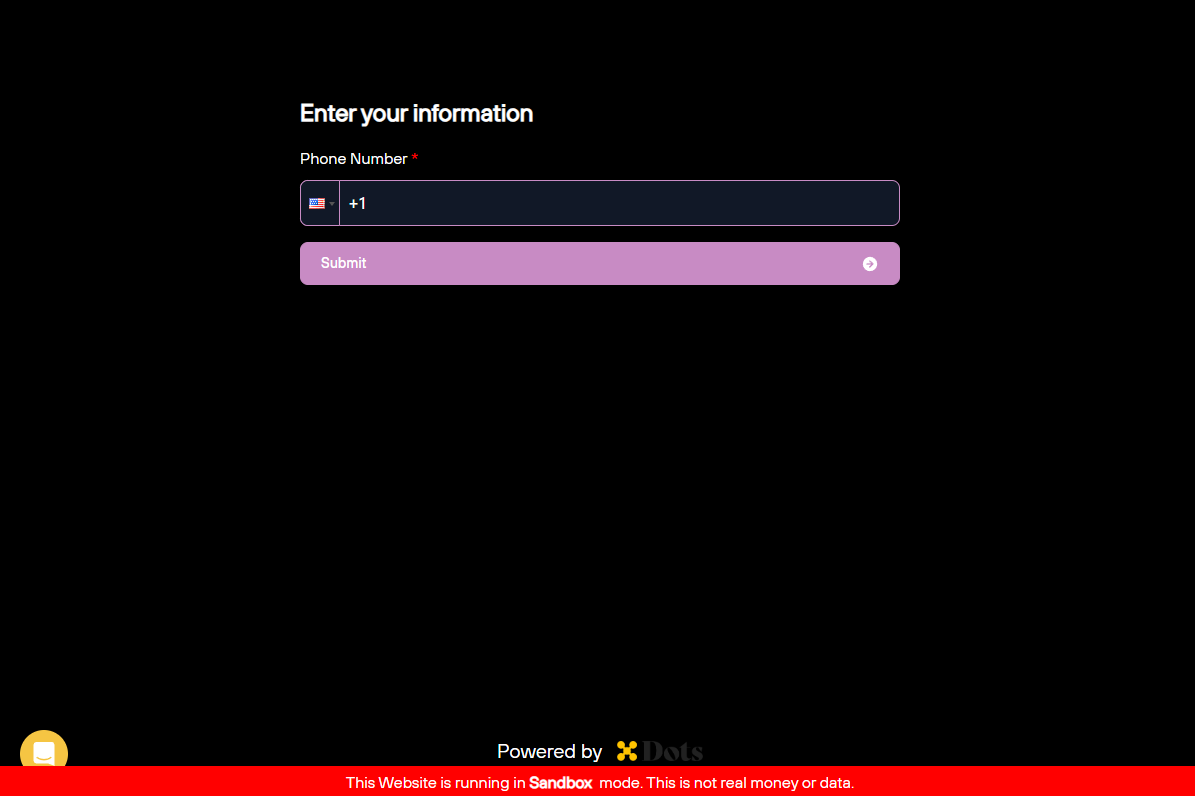
The following code block presents an example of how to customize the flow styles with specific configurations:
```javascript theme={null}
// Define the style configuration
const configurations = {
theme: "dark",
variables: {
backgroundColor: "#000000",
primaryTextColor: "#ffffff",
secondaryTextColor: "#9ca3af",
primaryColor: "#c88bc4",
tabBackgroundColor: "#111827",
tabHoverBackgroundColor: "#374151",
tabBorderColor: "#e5e7eb",
tabHoverBorderColor: "#7dd3fc",
buttonBackgroundColor: "#c88bc4",
buttonTextColor: "#ffffff",
buttonHoverTextColor: "#ffffff",
buttonHoverBackgroundColor: "#a672a2",
inputBackgroundColor: "#111827",
inputBorderColor: "#c88bc4",
buttonDisabledBackgroundColor: "#1f2937",
buttonDisabledTextColor: "#d1d5db",
inputPlaceholderColor: "#4b5563",
borderRadius: "8px"
}
};
// Stringify and URL encode the style configuration
const url_encoded_config = encodeURIComponent(JSON.stringify(configurations));
// Add the encoded configuration as a query parameter
const flowURI =
"https://my.senddotssandbox.com/flow/5f0f8f8f-f8f8-f8f8-f8f8-f8f8f8f8f8f8?styles=" +
url_encoded_config;
```
The following image presents the customization result: