> ## Documentation Index
> Fetch the complete documentation index at: https://dotsdev.mintlify.site/llms.txt
> Use this file to discover all available pages before exploring further.
# Create a Flow
Dots Flows provides a set of drop-in components that can be used to integrate Dots payouts into your mobile or web application easily. Thus, you can integrate various payout-related functionalities into your application using iframes.
Flows can be used to onboard users, collect compliance information, save payout methods, and initiate payouts. When a user interacts with a Flow, Dots can notify your application through webhooks.
This page presents how you can use flows to onboard users and create payouts. To accomplish it, you will:
1. Create a Flow to onboard a user.
2. Retrieve the new `user_id`.
3. Transfer the funds to the new user.
4. Create a Flow for the user to withdraw the funds.
Before starting, check if you fulfill the requirements and check all available steps you can use when creating a Flow in Dots.
## Requirements
Before creating a payout using Flows, you must have:
* A Dots account.
* Created an App using the [Dashboard](https://dashboard.dots.dev/) or the Dots API.
If you haven't completed one of these steps, access the [Getting Started](/guides/getting-started) before continuing.
## Flow Steps
Flow steps can be used individually or chained together. The following table presents all steps that are available to create a Flow.
| **Step** | **Description** | **Options Available** |
| ------------------ | ------------------------------------------------------------------------------------------------------------------------------------------------------------------------------------------------------------------------------------------------------------------------------------------------------------------------------------------------------------------------------------------------------------------- | ---------------------------------------------------------------------------------------------------------------------------------------------------------------------------------------------------------------------------------------------------------------------------------------------------------- |
| `onboard` | Creates a Dots user and verifies their phone number. | - `hide_continue_button` (boolean): Hides the continue button after the flow is completed.
|
| `compliance` | Collects tax information for the user based on their current location. This step will collect the user’s SSN, date of birth, and address if the user is based in the US. | - `hide_continue_button` (boolean): Hides the continue button after the flow is completed.
|
| `id-verification` | Collects and verifies a user’s government-issued ID and matches their facial scan to that ID. | - `hide_continue_button` (boolean): Hides the continue button after the flow is completed.
|
| `background-check` | Only available for U.S. based users who are over 18. Collects the user's information to run a background check including criminal history and sex offender registry. The status can be tracked via `background_check.status`: `not_started`, `started`, `pending`, `consider`, `pass`, `failed`, `canceled`, `expired`, or `information_mismatch`. If the check fails, `user.has_criminal_activity` will be `true`. | - `hide_continue_button` (boolean): Hides the continue button after the flow is completed.
|
| `manage-payouts` | Allows the user to add payout methods, set a default, and enable automatic payouts. | - `require_default_payout_method` (boolean): Require the user to select a default payout method.
- `require_auto_payout_method` (boolean): Require the user to set up auto-payout.
- `hide_continue_button` (boolean): Hides the continue button after the flow is completed.
|
| `manage-payments` | Enable the user to connect a bank account for ACH payments. | - `hide_continue_button` (boolean): Hides the continue button after the flow is completed.
|
| `payout` | Allows the user to initiate a payout to their preferred payout method. | - `payout_fee_party` (`platform`, `user`): Defines who pays the fee for the payout.
|
| `redirect` | Redirects the user to a URL of your choice. | - `redirect_url` (string): Defines the URL the user will be redirected to at the end of the Flow.
- `hide_continue_button` (bollean): Hides the continue button after the flow is completed.
|
| `pdf-form-fill` | Presents the user with a PDF form to fill out. | - `template_id` (string): The ID of the PDF template to use.
|
If a `user_id` is not provided, the `onboarding` step is automatically added to the start of all Flows.
When using the Sandbox environment, the compliance step will always be shown even if tax information has already been collected for the user. This allows testing the form without creating a new user.
## Creating Payouts Using Flows
When using Flows, you can customize the user journey. This guide will use two Flows, to first onboard the user, and then create a payout.
### 1. Onboarding Users
To onboard the user, you have to create the Flow that will create a Dots user, verify their phone number, and collect their tax information. To create the Flow, you'll use the [Create a Flow](/apireference/flows/create-a-flow). For this guide, only the `compliance` step will be added to the onboard flow.
To use the [Create a Flow](/apireference/flows/create-a-flow) endpoint, you have to provide your App credentials for the authentication. Access [API Authentication](/overview/authentication) for additional information.
The following code block presents request and response examples of creating a Flow using the [Create a Flow](/apireference/flows/create-a-flow) endpoint.
```sh Request theme={null}
curl --request POST \
--url https://pls.senddotssandbox.com/api/v2/flows/ \
--header 'Authorization: Basic cGtfZGV2X0g3V0tFOXlTRGhqeW91dFZBNEk3RkxhVkUzaWg1OnNrX2Rldl9lekFPNXA0WUNJeld6RWgwam5ubHFrODRkQ3ZFOQ==' \
--header 'Content-Type: application/json' \
--data '{
"steps": [
"compliance"
],
}'
```
```json Response theme={null}
{
"completed_steps": [],
"created": "2024-07-11T21:10:30.846081",
"id": "b3293101-35ef-451a-aad4-881da3697c2f",
"link": "https://my-sandbox.dots.dev/flow/b3293101-35ef-451a-aad4-881da3697c2f",
"metadata": null,
"payout_link_id": null,
"steps": [
"compliance"
],
"user_id": null
}
```
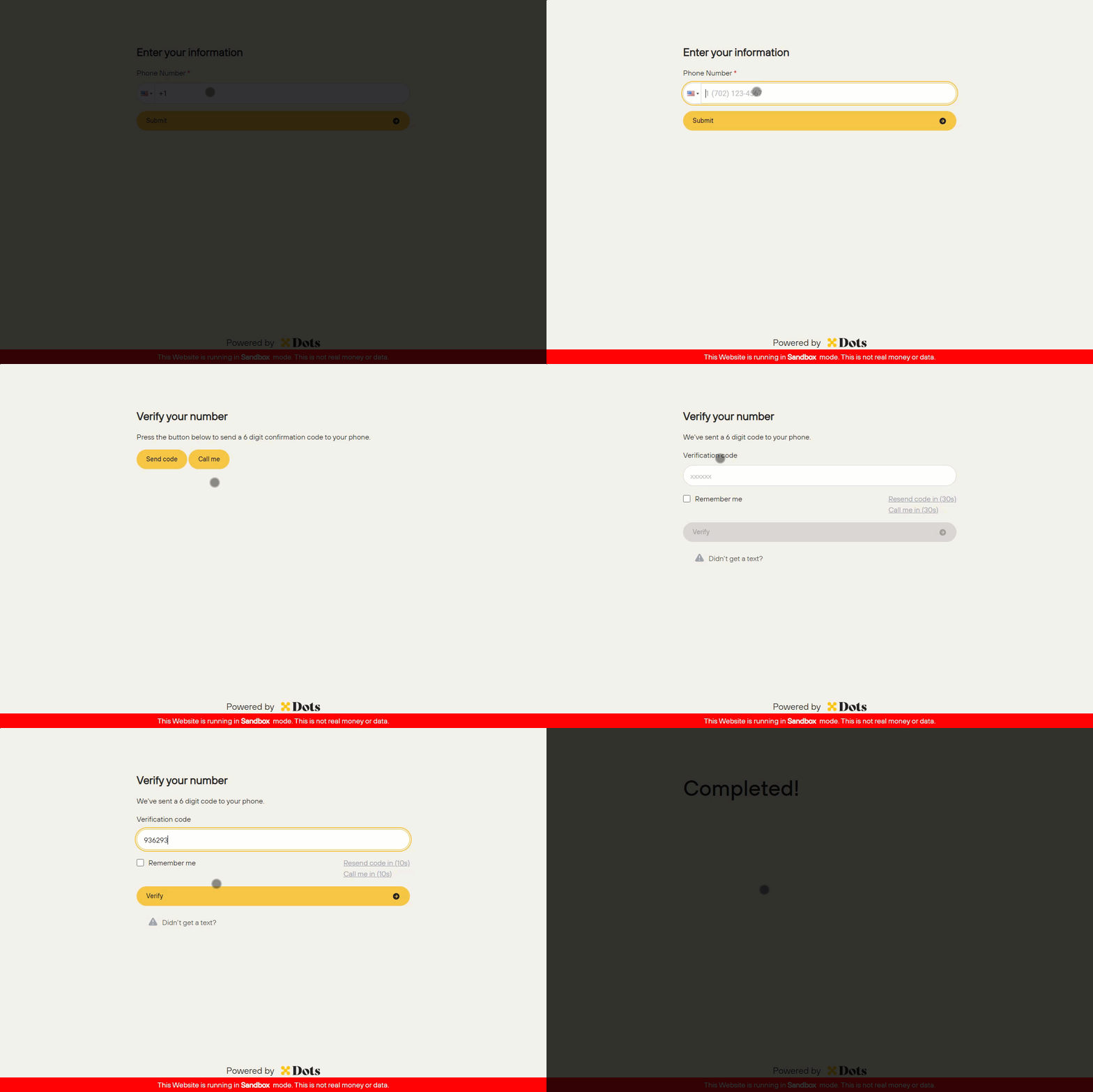
From the response, use the `link` to embed the onboard process into an iframe within your application. In addition, you'll use the Flow `id` to retrieve the user information after they complete the onboarding.
The GIF below presents the user interface provided by Dots, which is completely responsive, enabling you to integrate into any application.
 ### 2. Retrieving Flow Information
After the user completes the onboard Flow, you can create the payout. You should use webhooks to avoid checking multiple times to see if your customer has completed the onboarding. When the user completes each Flow step, a webhook will be triggered with the Flow’s `id` received in the previous step. See the [Webhooks](/references/webhooks) documentation page to learn how to configure your webhooks in Dots.
After receiving the confirmation, you can use the [Retrieve Flow Information](/apireference/flows/retrieve-a-flow) endpoint to have access to the new `user_id`. The following code block presents request and response examples of retrieving Flow information.
```sh Request theme={null}
curl --request GET \
--url https://pls.senddotssandbox.com/api/v2/flows/b3293101-35ef-451a-aad4-881da3697c2f \
--header 'Authorization: Basic cGtfZGV2X0g3V0tFOXlTRGhqeW91dFZBNEk3RkxhVkUzaWg1OnNrX2Rldl9lekFPNXA0WUNJeld6RWgwam5ubHFrODRkQ3ZFOQ==' \
```
```json Response theme={null}
{
"completed_steps": [],
"created": "2024-07-11T21:10:30.846081",
"id": "b3293101-35ef-451a-aad4-881da3697c2f",
"link": "https://my-sandbox.dots.dev/flow/b3293101-35ef-451a-aad4-881da3697c2f",
"metadata": null,
"payout_link_id": null,
"steps": [
"compliance"
],
"user_id": "f33919ae-6793-41bd-b512-1ad3c19f4ecb"
}
```
From the response, you have access to the `user_id`, which you'll use to create a payout Flow.
If you don't receive the `user_id`in your response, it means that the user hasn't finished the onboarding Flor.
### 3. Transfering Funds
Now that you have access to the user account information (`user_id`), you can transfer the funds related to the payout to their account. To perform this action, you'll use the [Create a Transfer](/apireference/transfers/create-a-transfer) endpoint, informing the `amount` to transfer and the receiver `user_id`.
The following code block presents request and response examples of creating a transfer using the `user_id` received in the previous step.
The `amount` value must be informed in cents. Use negative values to transfer money from your App to the user.
```sh Request theme={null}
curl --request POST \
--url https://pls.senddotssandbox.com/api/v2/transfers \
--header 'Authorization: Basic cGtfZGV2X0g3V0tFOXlTRGhqeW91dFZBNEk3RkxhVkUzaWg1OnNrX2Rldl9lekFPNXA0WUNJeld6RWgwam5ubHFrODRkQ3ZFOQ==' \
--header 'Content-Type: application/json' \
--data '{
"amount": -1000,
"user_id": "f33919ae-6793-41bd-b512-1ad3c19f4ecb"
}'
```
```json Response theme={null}
{
"amount": "-1000",
"created": "2024-07-11T21:17:33.959976",
"external_data": {},
"id": "847e70b4-e057-457e-aa89-ba0312f159c1",
"metadata": null,
"status": "completed",
"status_history": [
{
"status": "completed",
"timestamp": "Thu, 11 Jul 2024 21:17:33 GMT"
}
],
"transactions": [
{
"amount": "1000.0000000000",
"created": "2024-07-11T21:17:33.950405",
"destination_name": "enamored-education",
"id": 767354,
"metadata": null,
"source_name": "TestWriteChoiceApp",
"type": "balance"
}
],
"type": "balance",
"user_id": "f33919ae-6793-41bd-b512-1ad3c19f4ecb"
}
```
By checking the response `status`, you can see that the transfer was `completed`. Therefore, the funds are in the user account, and now you need to create a Flow to enable them to withdraw these funds.
### 4. Withdrawing Funds
To complete the payout process, you need to enable the user to withdraw the transferred funds using their preferred payment method. To accomplish this, you can create a new Flow, selecting the `payout` step and informing the `user_id` retrieve in Step 2. Since you provide the `user_id`, the onboarding steps won't be presented to your user.
The following code block presents request and response examples of creating a Flow using the [Create a Flow](/apireference/flows/create-a-flow) endpoint with only the `payout` step.
The link will stay authenticated for 15 minutes. If the user takes longer than 15 minutes to complete the Flow, they will need to re-authenticate through an SMS verification code.
```sh Request theme={null}
curl --request POST \
--url https://pls.senddotssandbox.com/api/v2/flows/ \
--header 'Authorization: Basic cGtfZGV2X0g3V0tFOXlTRGhqeW91dFZBNEk3RkxhVkUzaWg1OnNrX2Rldl9lekFPNXA0WUNJeld6RWgwam5ubHFrODRkQ3ZFOQ==' \
--header 'Content-Type: application/json' \
--data '{
"steps": [
"payout"
],
}'
```
```json Response theme={null}
{
"completed_steps": [],
"created": "2024-07-12T11:08:32.486385",
"id": "6ad6b948-422d-4fc4-bd6c-fe1521639a2b",
"link": "https://my-sandbox.dots.dev/flow/6ad6b948-422d-4fc4-bd6c-fe1521639a2b",
"metadata": null,
"payout_link_id": null,
"steps": [
"payout"
],
"user_id": "f33919ae-6793-41bd-b512-1ad3c19f4ecb"
}
```
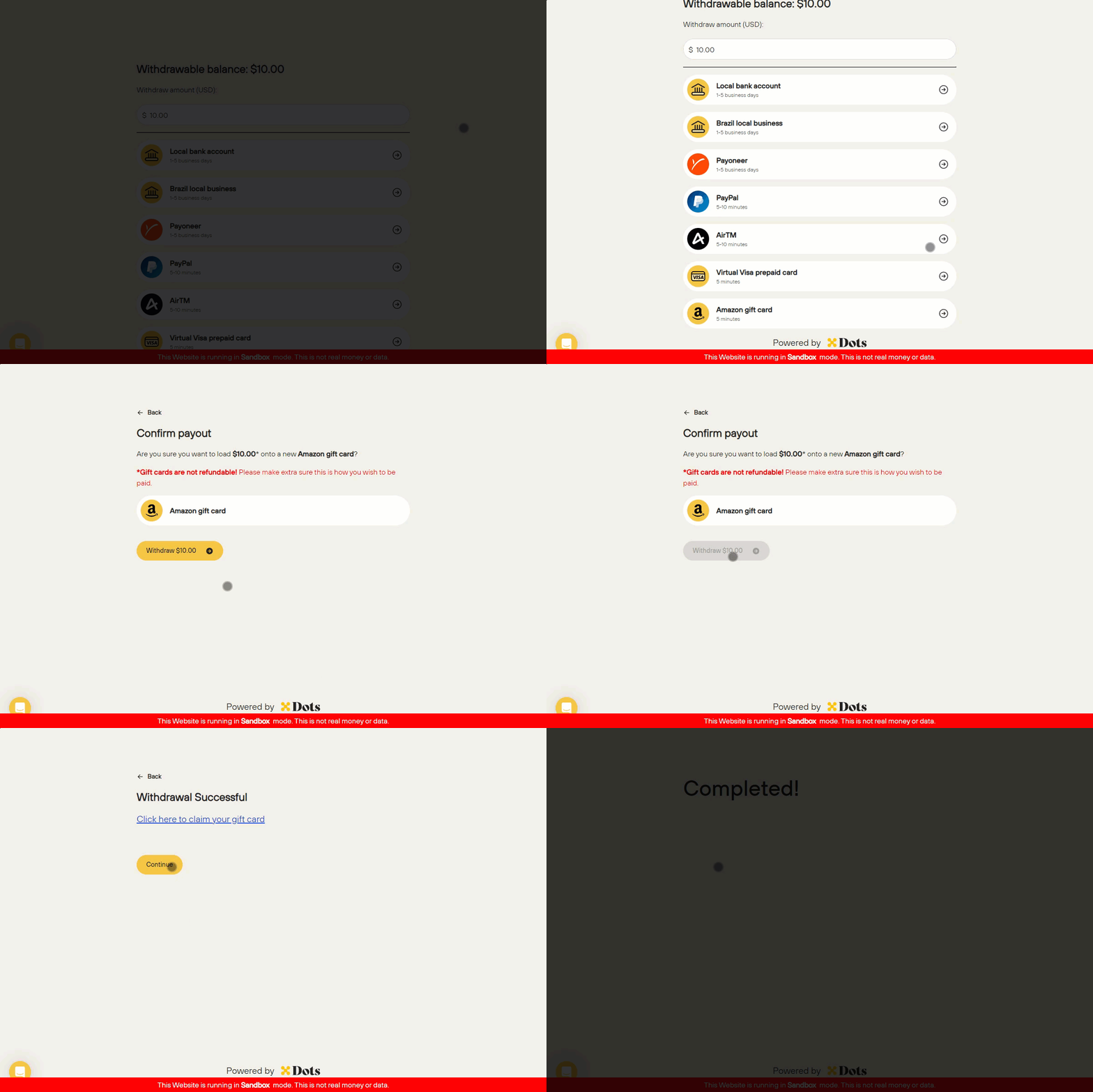
From the response, use the `link` to embed the payout process into an iframe within your application. The GIF below presents the user interface provided by Dots.
### 2. Retrieving Flow Information
After the user completes the onboard Flow, you can create the payout. You should use webhooks to avoid checking multiple times to see if your customer has completed the onboarding. When the user completes each Flow step, a webhook will be triggered with the Flow’s `id` received in the previous step. See the [Webhooks](/references/webhooks) documentation page to learn how to configure your webhooks in Dots.
After receiving the confirmation, you can use the [Retrieve Flow Information](/apireference/flows/retrieve-a-flow) endpoint to have access to the new `user_id`. The following code block presents request and response examples of retrieving Flow information.
```sh Request theme={null}
curl --request GET \
--url https://pls.senddotssandbox.com/api/v2/flows/b3293101-35ef-451a-aad4-881da3697c2f \
--header 'Authorization: Basic cGtfZGV2X0g3V0tFOXlTRGhqeW91dFZBNEk3RkxhVkUzaWg1OnNrX2Rldl9lekFPNXA0WUNJeld6RWgwam5ubHFrODRkQ3ZFOQ==' \
```
```json Response theme={null}
{
"completed_steps": [],
"created": "2024-07-11T21:10:30.846081",
"id": "b3293101-35ef-451a-aad4-881da3697c2f",
"link": "https://my-sandbox.dots.dev/flow/b3293101-35ef-451a-aad4-881da3697c2f",
"metadata": null,
"payout_link_id": null,
"steps": [
"compliance"
],
"user_id": "f33919ae-6793-41bd-b512-1ad3c19f4ecb"
}
```
From the response, you have access to the `user_id`, which you'll use to create a payout Flow.
If you don't receive the `user_id`in your response, it means that the user hasn't finished the onboarding Flor.
### 3. Transfering Funds
Now that you have access to the user account information (`user_id`), you can transfer the funds related to the payout to their account. To perform this action, you'll use the [Create a Transfer](/apireference/transfers/create-a-transfer) endpoint, informing the `amount` to transfer and the receiver `user_id`.
The following code block presents request and response examples of creating a transfer using the `user_id` received in the previous step.
The `amount` value must be informed in cents. Use negative values to transfer money from your App to the user.
```sh Request theme={null}
curl --request POST \
--url https://pls.senddotssandbox.com/api/v2/transfers \
--header 'Authorization: Basic cGtfZGV2X0g3V0tFOXlTRGhqeW91dFZBNEk3RkxhVkUzaWg1OnNrX2Rldl9lekFPNXA0WUNJeld6RWgwam5ubHFrODRkQ3ZFOQ==' \
--header 'Content-Type: application/json' \
--data '{
"amount": -1000,
"user_id": "f33919ae-6793-41bd-b512-1ad3c19f4ecb"
}'
```
```json Response theme={null}
{
"amount": "-1000",
"created": "2024-07-11T21:17:33.959976",
"external_data": {},
"id": "847e70b4-e057-457e-aa89-ba0312f159c1",
"metadata": null,
"status": "completed",
"status_history": [
{
"status": "completed",
"timestamp": "Thu, 11 Jul 2024 21:17:33 GMT"
}
],
"transactions": [
{
"amount": "1000.0000000000",
"created": "2024-07-11T21:17:33.950405",
"destination_name": "enamored-education",
"id": 767354,
"metadata": null,
"source_name": "TestWriteChoiceApp",
"type": "balance"
}
],
"type": "balance",
"user_id": "f33919ae-6793-41bd-b512-1ad3c19f4ecb"
}
```
By checking the response `status`, you can see that the transfer was `completed`. Therefore, the funds are in the user account, and now you need to create a Flow to enable them to withdraw these funds.
### 4. Withdrawing Funds
To complete the payout process, you need to enable the user to withdraw the transferred funds using their preferred payment method. To accomplish this, you can create a new Flow, selecting the `payout` step and informing the `user_id` retrieve in Step 2. Since you provide the `user_id`, the onboarding steps won't be presented to your user.
The following code block presents request and response examples of creating a Flow using the [Create a Flow](/apireference/flows/create-a-flow) endpoint with only the `payout` step.
The link will stay authenticated for 15 minutes. If the user takes longer than 15 minutes to complete the Flow, they will need to re-authenticate through an SMS verification code.
```sh Request theme={null}
curl --request POST \
--url https://pls.senddotssandbox.com/api/v2/flows/ \
--header 'Authorization: Basic cGtfZGV2X0g3V0tFOXlTRGhqeW91dFZBNEk3RkxhVkUzaWg1OnNrX2Rldl9lekFPNXA0WUNJeld6RWgwam5ubHFrODRkQ3ZFOQ==' \
--header 'Content-Type: application/json' \
--data '{
"steps": [
"payout"
],
}'
```
```json Response theme={null}
{
"completed_steps": [],
"created": "2024-07-12T11:08:32.486385",
"id": "6ad6b948-422d-4fc4-bd6c-fe1521639a2b",
"link": "https://my-sandbox.dots.dev/flow/6ad6b948-422d-4fc4-bd6c-fe1521639a2b",
"metadata": null,
"payout_link_id": null,
"steps": [
"payout"
],
"user_id": "f33919ae-6793-41bd-b512-1ad3c19f4ecb"
}
```
From the response, use the `link` to embed the payout process into an iframe within your application. The GIF below presents the user interface provided by Dots.
 ## What's Next?
In addition to customizing the user journey, you can customize the Flow appearance. See [Flow Styles](guides/flow-styles) to learn how to change the Flows' appearance to match your branding.
## What's Next?
In addition to customizing the user journey, you can customize the Flow appearance. See [Flow Styles](guides/flow-styles) to learn how to change the Flows' appearance to match your branding.